HOW DOES THE LOGITECH G502 DPI SHIFT BUTTON WORK?

HOW DOES THE LOGITECH G502 DPI SHIFT BUTTON WORK?

The Logitech G502 DPI shift button, also called the “sniper button”, instantly drops mouse sensitivity during gameplay for surgical focus when scoped on a target. Here’s how you can integrate it into your gaming strategy.

The Logitech G502 DPI shift button, also called the “sniper button”, instantly drops mouse sensitivity during gameplay for surgical focus when scoped on a target. Here’s how you can integrate it into your gaming strategy.

HOW THE DPI SHIFT BUTTON WORKS

The Logitech G502 DPI Shift button, also called the “sniper button”, instantly drops mouse sensitivity during gameplay for surgical focus when scoped on a target. Most DPI cycle buttons force you to click through multiple profiles. The G502 DPI Shift acts exactly like a keyboard shift key, instantly dropping the tracking output down to a pre-set sensitivity for exactly as long as the button is held, then snapping back instantly upon release. This is crucial to how the DPI Shift feature should work in real world gameplay. It has to be an almost effortless, muscle-memory command where the entire sequence happens in less than half a second, if done correctly. It’s a matter of life or death (in a video game). 

DPI, or Dots Per Inch, quantifies on-screen cursor movement relative to each physical inch of travel across your desk. The higher the DPI, the faster the on-screen flick. But lower it and you suddenly have meticulous control over sensitivity levels, all thanks to Logitech's legendary HERO optical sensor. Serious snipers can calibrate the sensor down to a pixel-perfect 100 DPI. Beyond its role as a sensitivity brake, the dedicated side button functions as a programmable multi-tool via Logitech G HUB software, the command center for all G502 settings. Depending on your specific workflow, you can remap this button for tactical in-game pings, custom keyboard shortcuts, or complex productivity macros.

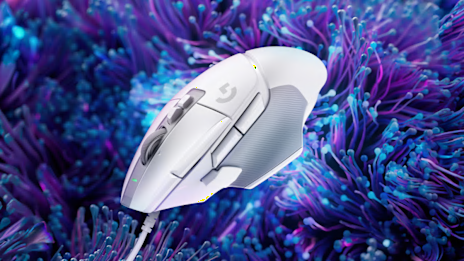
The DPI Shift button comes in two variations, depending on the G502 iteration. The earlier models have a fixed version, the later X series have a customizable button you can adjust to your preference.
HOW TO CHANGE THE G502 SNIPER BUTTON POSITION

In the legacy layout, the fixed side-button occasionally causes accidental click issues. This can be remedied by unassigning the button altogether. The newer G502 X family addresses misclicks by making the DPI Shift button ergonomically adjustable. 

To accommodate varying hand sizes and grip styles—such as palm, claw, or fingertip dynamics—you can physically manipulate the trigger itself. The physical switch mechanism can be flipped forward, reversed backward, extended, or completely swapped out with an included blank flat cover. It’s a clever but simple way to prevent accidental activation during intense movement while keeping the button thumb-accessible for split-second reaction.

LOGITECH G HUB DPI SHIFT SETUP GUIDE: INFINITE USES

Through Logitech’s G HUB software, the DPI Shift button transforms from a simple sensitivity brake into a macro-multitool. You are not locked into DPI control; you can reassign this dedicated side switch to a wide variety of actions.

Power users can map the button to push-to-talk, tactical pings, weapon swaps, media controls, application shortcuts, Discord functions, streaming controls, an array of productivity commands, or even custom G-Shift layers to unlock secondary utility mappings. In other words, the button is millimeters from your thumb, make the most of it.

WHICH GAMER PROFILE FITS THE DPI SHIFT COMMAND?

The Tactical FPS Sniper: The DPI Shift command answers the need for sudden micro-control to line up precision headshots under stress.

The Multi-Genre Vehicle Pilot: In chaotic environments, map the button to instantly transition between infantry gunplay, driving armored vehicles, or piloting aircrafts.

The Hybrid Power Productivity User: Use it to cycle desktops, window management, or custom copy-paste macro layers. Adobe power-users will find infinite uses. 

Earning its reputation as the "sniper button," the DPI Shift is strategically positioned for peak performance. While highly specialized for precision, its true value lies in its versatility, allowing you to remap its function to suit any specific need.