ESPORTS PLAYERS’ HITS CODES: HOW TO SET UP SUPERSTRIKE IN G HUB

ESPORTS PLAYERS’ HITS CODES: HOW TO SET UP SUPERSTRIKE IN G HUB

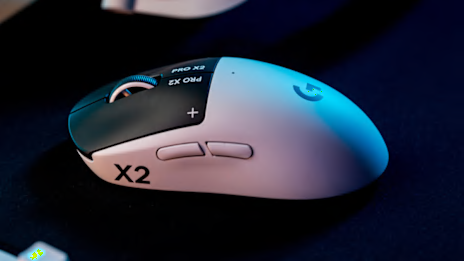
When you play the same game for thousands of hours, you learn a few things about how the game’s software and your PC’s hardware work together. This becomes incredibly useful information when your mouse, for example, can be configured with micro-level granularity. No one knows this better than professional esports players using the PRO X2 SUPERSTRIKE.  


When you play the same game for thousands of hours, you learn a few things about how the game’s software and your PC’s hardware work together. This becomes incredibly useful information when your mouse, for example, can be configured with micro-level granularity. No one knows this better than professional esports players using the PRO X2 SUPERSTRIKE.  


We worked directly with dozens of esports pros to capture how they customize their mouse for competition. Each player fine-tuned the Haptic Inductive Trigger System (HITS) on their PRO X2 SUPERSTRIKE for the game they compete in, then shared those settings as HITS Codes on G HUB, and in this post we are sharing them with you so you can play like a pro, so to speak. 

Let’s be clear: copying a pro’s settings won’t instantly turn you into a pro. Talent, practice, confidence, and instinct are as important as your mouse settings. But this is how some of the pros set up their PRO X2 SUPERSTRIKE—and it’s a great place for you to start.


Player- Game Actuation
Point- L
Actuation
Point- R
Rapid
Trigger- L
Rapid
Trigger- R
Click
Haptic- L
Click
Haptics- R
HITS Code
INS- CS2 4 5 3 Disabled 4 3 MDAwNDA1MDMwNTEwMDQwMw==
Coach Joe-
Valorant
2 2 2 2 3 3 MDAwMjAyMDIwMjExMDQwMw==
KSCERATO-
CS2
2 2 3 Disabled 3 3 MDAwMjAyMDMwMjExMDMwMw==
Siwoo- LoL 2 2 1 1 3 3 MDAwMjAyMDEwMTExMDMwMw==
Lucid- LoL 5 5 1 1 3 3 MDAwNTAxMDEwMTExMDMwMw==
ShowMaker-
LoL
2 2 1 1 2 2 MDAwMjAyMDEwMTExMDIwMg==
Smash- LoL 2 2 2 2 1 1 MDAwMjAyMDIwMjExMDEwMQ==
Career- LoL 2 2 2 2 4 4 MDAwMjAyMDIwMjExMDQwNA==
McFaliN-
Valorant
4 5 2 2 3 5 MDAwNDA1MDIwMjExMDMwNQ==
Yetujey-
Valorant
4 4 3 3 2 2 MDAwNDA0MDMwMzExMDIwMg==
Blaz- R6 6 6 3 3 Off Off MDAwNjA2MDMwMzExMDAwMA==
Doki- R6 6 6 1 1 5 5 MDAwNjA2MDEwMTExMDU1NQ==

The above table lists each pro player’s gamer tag, their competitive title, the exact HITS configurations they use in competition and the HITS Code you can use to import those precise settings.

Each code reflects how that player has tuned actuation point, right and left Rapid Trigger and click haptics settings on their PRO X2 SUPERSTRIKE for the specific game in which they compete.

How to import HITS Codes in G HUB:

  1. Open G HUB and select PRO X2 SUPERSTRIKE

  2. Navigate to HITS in the left-hand menu

  3. Click the icon next to HITS Code at the top of the page

  4. Select Import HITS Code

  5. Paste the code and apply

That’s it. Your mouse will save the setting and reconfigure instantly.

Sensitivity Settings


Player- Game DPI x-Axis DPI y-Axis Lift Off
Distance
Wired Report
Rate
Wireless Report
Rate
INS- CS2 800 800 Medium 1000 Hz 4000 Hz
Coach Joe- Valorant 800 800 Medium 1000 Hz 4000 Hz
KSCERATO- CS2 800 800 Medium 1000 Hz 4000 Hz
Siwoo- LoL 1650 1650 Medium 1000 Hz 4000 Hz
Lucid- LoL 800 800 Medium 1000 Hz 1000 Hz
ShowMaker- LoL 2500 2500 Medium 1000 Hz 1000 Hz
Smash- LoL 1600 1600 Medium 1000 Hz 1000 Hz
Career- LoL 1600 1600 Medium 1000 Hz 1000 Hz
MrFaliN- Valorant n/a n/a n/a n/a n/a
Yetuje- Valorant n/a n/a n/a 1000 Hz 1000 Hz
Blaz- R6 400 400 Medium 1000 Hz 4000 Hz
Doki- R6 400 400 Medium 1000 Hz 4000 Hz

Professional players carefully calibrate their mouse DPI along both the X and Y axes, tailoring it to the specific title, their in-game role, and their developed muscle memory. Often the type of game is a major influence.

The pros we consulted reflect some common patterns around sensitivity settings and game type. Our FPS pros typically opted for low sensitivity coupled with a high wireless report rate (“polling”) to achieve optimal stability, accuracy and precision. The MOBA players in the above group generally preferred much higher sensitivity to enable rapid cursor movement and efficient screen coverage.

Ultimately, there is no single "best" setting; the ideal configuration is entirely dependent on the specific game, playstyle, and your needs.

Button Assignment


Player- Game Button 1 Button 2 Button 3 Button 4 Button 5
INS- CS2 Primary Click Secondary Click Middle Click Back Button Forward Button
Coach Joe- Valorant Primary Click Secondary Click Middle Click Back Button Forward Button
KSCERATO- CS2 Primary Click Secondary Click Middle Click Back Button Forward Button
Siwoo- LOL Primary Click Secondary Click Middle Click Back Button Forward Button
Lucid- LoL Primary Click Secondary Click Middle Click Back Button Forward Button
ShowMaker- LoL Primary Click Secondary Click Middle Click Back Button Forward Button
Smash- LoL Primary Click Secondary Click Middle Click Back Button Forward Button
Career- LoL Primary Click Secondary Click Middle Click Back Button Forward Button
MrFaLin- Valorant Primary Click Secondary Click Middle Click Back Button Forward Button
Yetujey- Valorant Primary Click Secondary Click Middle Click Back Button Forward Button
Blaz- R6 Primary Click Secondary Click Middle Click Back Button Forward Button
Doki- R6 Primary Click Secondary Click Middle Click Back Button Forward Button

Though you can customise all the buttons on the PRO X2 SUPERSTRIKE, every pro player we consulted stuck with their factory default assignments. It really goes to show that the standard setup is intuitive and expertly tuned for competitive gaming—it lets players rely on their skills and experience to maximize reaction time and ultimately.

BHOP Mode


Player- Game BHOP Mode BHOP Sensitivity (ms)
INS- CS2 Enabled 100
Coach Joe- Valorant Disabled  
KSCERATO- CS2 Disabled  
Siwoo- LoL Disabled  
Lucid- LoL Disabled  
ShowMaker- LoL Disabled  
Smash- LoL Disabled  
Career- LoL Disabled  
MrFaliN- Valorant n/a  
Yetujey- Valorant Disabled  
Blaz- R6 Disabled  
Doki- R6 Disabled  

BHOP MODE (Bunny Hop) is enabled by only one player in this group: INS from FlyQuest.

That restraint isn’t accidental. Just like button mapping, bunny hopping depends heavily on muscle memory and timing. While all presets can be modified, most pros in our group prefer to keep this setting off unless it’s already second nature.

We recommend experimenting with a variety of the settings to find your own. Every pro player’s HITS Code is a great starting point; they’re not locked so you can even improve what the pros are using.